Features

Scheduling

Smart schedulingTimes that fit your route, with the reason whyCalendarWeek, month and year, synced to your phoneBooking page & brandingYour logo, your services, clients book themselves

Clients & pianos

Automated remindersEmails and texts before and after a piano is duePiano recordsEvery tuning, reading and issue on fileImport from Gazelle & moreBring your whole book over from Gazelle

On the job

On the roadLive-traffic ETAs and running-late textsVoice notesTalk through the visit, get a clean recordEstimates, invoices & paymentsGet paid by card, straight from the invoice
Everything a piano technician needs, from the first call to the paid invoice.See all features
Features

Scheduling

Smart schedulingCalendarBooking page & branding

Clients & pianos

Automated remindersPiano recordsImport from Gazelle & more

On the job

On the roadVoice notesEstimates, invoices & payments
PricingAboutContact
PianobookerPianobooker
...
Features

Scheduling

Smart schedulingTimes that fit your route, with the reason whyCalendarWeek, month and year, synced to your phoneBooking page & brandingYour logo, your services, clients book themselves

Clients & pianos

Automated remindersEmails and texts before and after a piano is duePiano recordsEvery tuning, reading and issue on fileImport from Gazelle & moreBring your whole book over from Gazelle

On the job

On the roadLive-traffic ETAs and running-late textsVoice notesTalk through the visit, get a clean recordEstimates, invoices & paymentsGet paid by card, straight from the invoice
Everything a piano technician needs, from the first call to the paid invoice.See all features
Features

Scheduling

Smart schedulingCalendarBooking page & branding

Clients & pianos

Automated remindersPiano recordsImport from Gazelle & more

On the job

On the roadVoice notesEstimates, invoices & payments
PricingAboutContact
All features

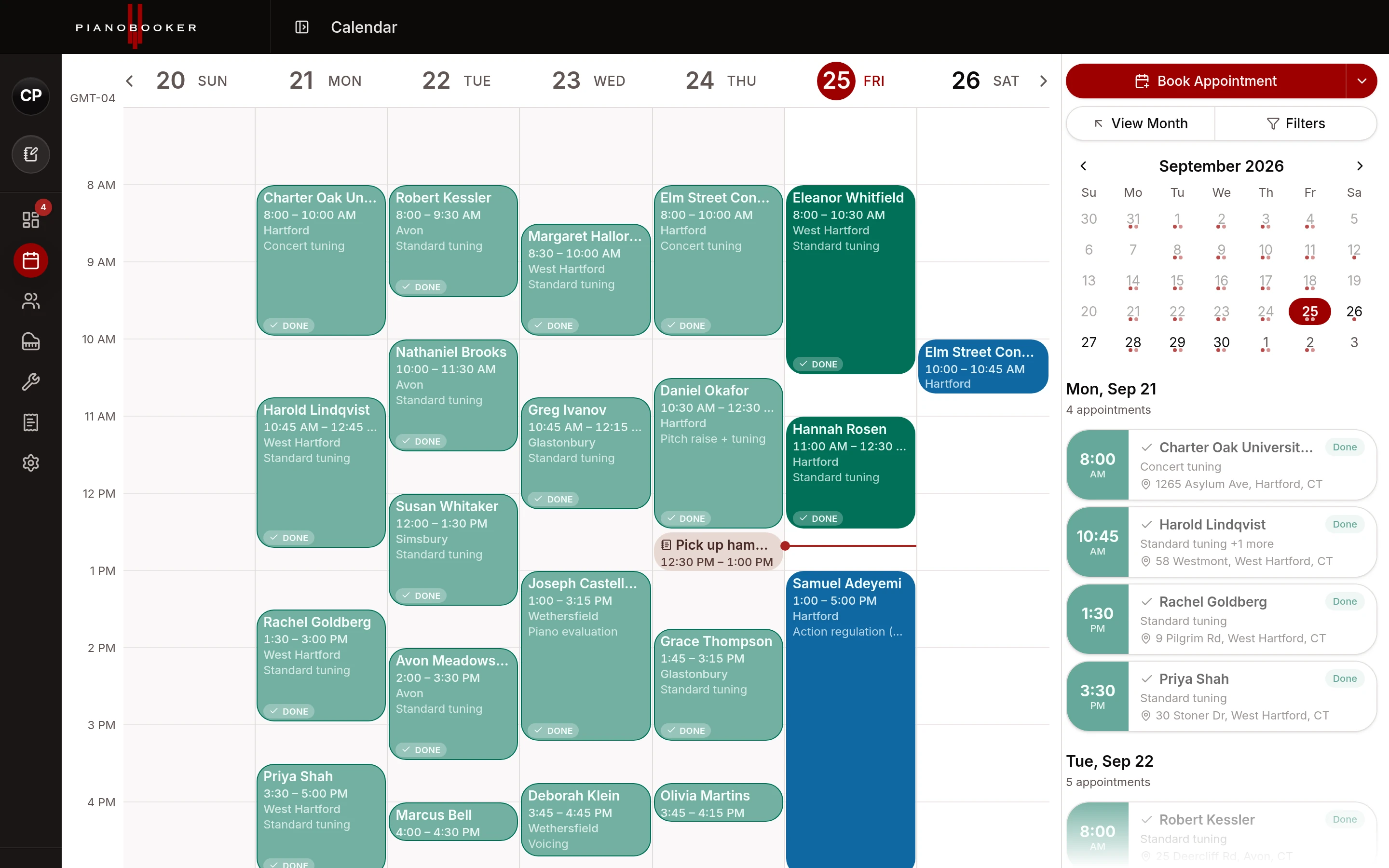
Your whole season on one screen.

Week, month and year views on the desktop, and an agenda built for the phone. Every visit shows who, which piano and where, and the drive to and from the visits either side is one hover away.

Right-click any empty time to book a visit, block time, add a note or add a break.
Join the waiting listTalk to Randy
A full week on the calendar: every visit with its client, town and service
In depth

What the calendar does for you.

Views that match how you plan

Week for the days ahead, month for the shape of the season, year for when you are planning around a school's spring recital. On a phone the calendar becomes an agenda: a strip of the week across the top and the day's visits below, with a month agenda too.

Blocked time and breaks

Block off a morning for a rebuild in the shop, or set a lunch break that repeats every weekday. Blocked time can repeat weekly on the days you choose, and clients can never book over it. A break can carry an address, so lunch at home counts in the day's driving.

The drive between visits

Hover a visit to see the drive from the one before it and to the one after it. Where a drive has not been measured yet, one tap checks it.

Show only what matters

Show or hide breaks, blocked time and notes, hide canceled, completed and no-show visits, and switch between your business's time zone and your own when you are travelling.

Requests wait for you

Nothing a client books goes on your calendar until you say so. Approve a request as a new client or match it to one you already have, or decline it and keep the lead for later. Reschedule and cancel requests from clients wait for you too.

On your phone's calendar too

Subscribe from Google Calendar, Apple Calendar or Outlook with one click and your Pianobooker visits appear there, from the last month to a year ahead, next to the rest of your life. It is a one-way feed: you book and change visits in Pianobooker, and your other calendar follows.

Questions & answers

Does it sync both ways with Google Calendar?
No. Pianobooker publishes a feed your Google, Apple or Outlook calendar subscribes to, so your visits show up there. Events you add in Google do not come back into Pianobooker, so block time in Pianobooker when you need it kept free.
How quickly do changes reach my phone's calendar?
Apple Calendar and Outlook check the feed regularly. Google Calendar decides for itself how often it refreshes subscribed calendars, which can take several hours.
Can I drag appointments to move them?
Not yet. Open the visit and choose Reschedule, and the client gets the updated time automatically.
Can I keep my link private?
Your feed link is secret to you. If it ever gets shared, generate a new one and the old link stops working.
Keep exploring

Works hand in hand with

Smart scheduling

Pianobooker reads your week, prices every opening by the driving it adds, and suggests the times that fit your route, with the reason for each.

Learn more

Booking page & branding

A booking page with your logo, your services and your hours. Clients pick a time and you approve it before anything lands on the calendar.

Learn more

On the road

Check the drive to your next client with live traffic, and send "on my way" or "running late" texts with the time already filled in.

Learn more

Be one of the first technicians in.

Pianobooker is in private beta with working piano technicians, and we’re letting more in a few at a time. Join the waiting list, or talk to Randy about how it would fit your business.

Join the waiting listTalk to Randy

Product

  • Features
  • Pricing
  • Join the waiting list
  • Log in

Company

  • About
  • Contact

Legal

  • Privacy Policy
  • Terms of Service
  • SMS terms
© 2026 Pianobooker, LLC
Features

Scheduling

Smart schedulingTimes that fit your route, with the reason whyCalendarWeek, month and year, synced to your phoneBooking page & brandingYour logo, your services, clients book themselves

Clients & pianos

Automated remindersEmails and texts before and after a piano is duePiano recordsEvery tuning, reading and issue on fileImport from Gazelle & moreBring your whole book over from Gazelle

On the job

On the roadLive-traffic ETAs and running-late textsVoice notesTalk through the visit, get a clean recordEstimates, invoices & paymentsGet paid by card, straight from the invoice
Everything a piano technician needs, from the first call to the paid invoice.See all features
Features

Scheduling

Smart schedulingCalendarBooking page & branding

Clients & pianos

Automated remindersPiano recordsImport from Gazelle & more

On the job

On the roadVoice notesEstimates, invoices & payments
PricingAboutContactLog in
PianobookerPianobooker
Log inJoin the waiting listJoin waitlist
Features

Scheduling

Smart schedulingTimes that fit your route, with the reason whyCalendarWeek, month and year, synced to your phoneBooking page & brandingYour logo, your services, clients book themselves

Clients & pianos

Automated remindersEmails and texts before and after a piano is duePiano recordsEvery tuning, reading and issue on fileImport from Gazelle & moreBring your whole book over from Gazelle

On the job

On the roadLive-traffic ETAs and running-late textsVoice notesTalk through the visit, get a clean recordEstimates, invoices & paymentsGet paid by card, straight from the invoice
Everything a piano technician needs, from the first call to the paid invoice.See all features
Features

Scheduling

Smart schedulingCalendarBooking page & branding

Clients & pianos

Automated remindersPiano recordsImport from Gazelle & more

On the job

On the roadVoice notesEstimates, invoices & payments
PricingAboutContactLog in