Features

Scheduling

Smart schedulingTimes that fit your route, with the reason whyCalendarWeek, month and year, synced to your phoneBooking page & brandingYour logo, your services, clients book themselves

Clients & pianos

Automated remindersEmails and texts before and after a piano is duePiano recordsEvery tuning, reading and issue on fileImport from Gazelle & moreBring your whole book over from Gazelle

On the job

On the roadLive-traffic ETAs and running-late textsVoice notesTalk through the visit, get a clean recordEstimates, invoices & paymentsGet paid by card, straight from the invoice
Everything a piano technician needs, from the first call to the paid invoice.See all features
Features

Scheduling

Smart schedulingCalendarBooking page & branding

Clients & pianos

Automated remindersPiano recordsImport from Gazelle & more

On the job

On the roadVoice notesEstimates, invoices & payments
PricingAboutContact
PianobookerPianobooker
...
Features

Scheduling

Smart schedulingTimes that fit your route, with the reason whyCalendarWeek, month and year, synced to your phoneBooking page & brandingYour logo, your services, clients book themselves

Clients & pianos

Automated remindersEmails and texts before and after a piano is duePiano recordsEvery tuning, reading and issue on fileImport from Gazelle & moreBring your whole book over from Gazelle

On the job

On the roadLive-traffic ETAs and running-late textsVoice notesTalk through the visit, get a clean recordEstimates, invoices & paymentsGet paid by card, straight from the invoice
Everything a piano technician needs, from the first call to the paid invoice.See all features
Features

Scheduling

Smart schedulingCalendarBooking page & branding

Clients & pianos

Automated remindersPiano recordsImport from Gazelle & more

On the job

On the roadVoice notesEstimates, invoices & payments
PricingAboutContact
All features

Let clients book themselves, on your terms.

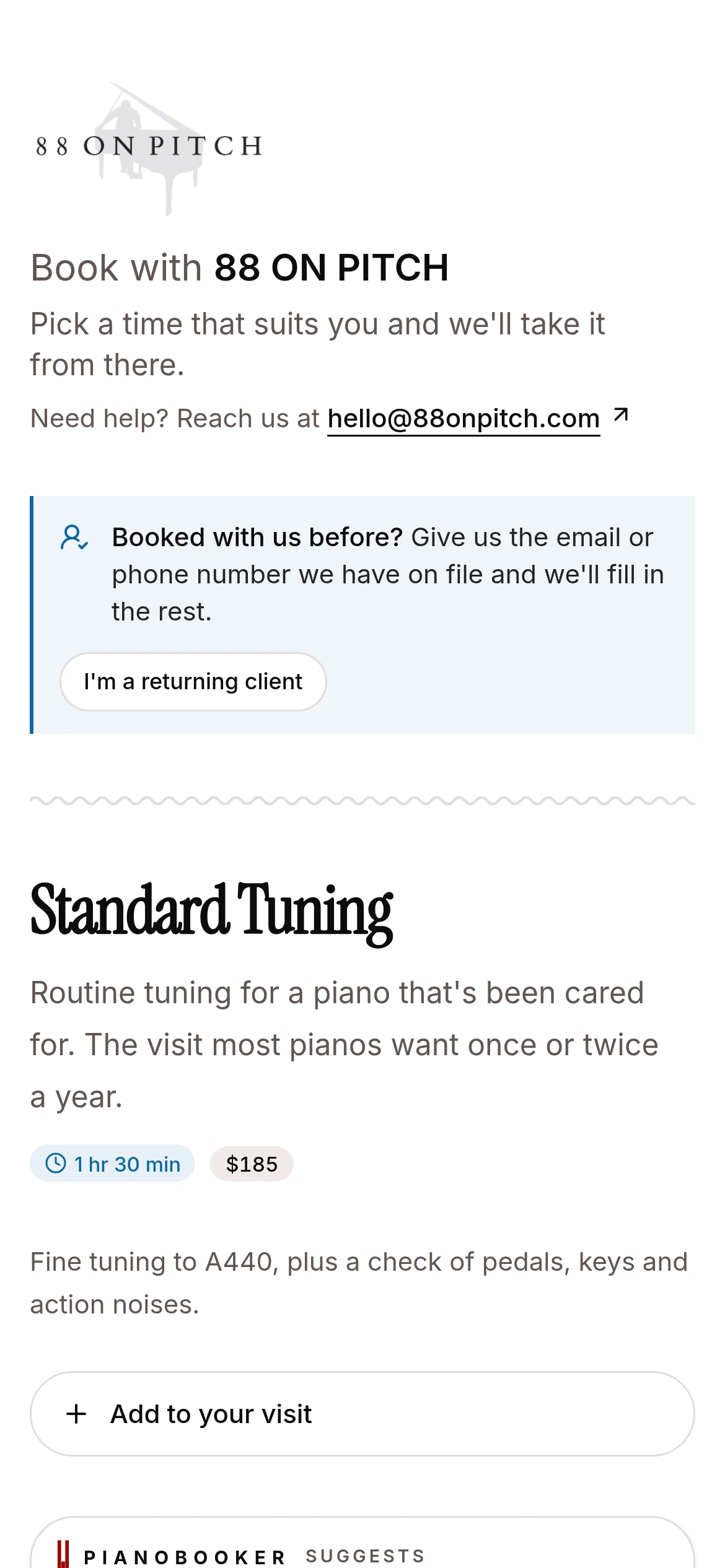
Your booking page carries your logo and your colors, lists the services you choose at the prices you set, and only offers times that fit your hours. Clients pick a time and tell you about the piano. You approve it, and only then does it land on your calendar.
Join the waiting listTalk to Randy
A technician's own booking page, with their logo, on a client's phone
How it works

What your client sees.

  1. 1

    Choose the visit

    A standard tuning, a longer service, or whatever pages you have made, with extras they can add.

  2. 2

    Pick a time

    Only real openings within your hours and notice, ranked to suit your route when you know their address.

  3. 3

    Tell you about it

    Name, contact details, the address with autocomplete, and a note about the piano.

  4. 4

    Hear back

    They get a "request received" message straight away, and a confirmation when you approve.

In depth

Your services, your prices, your look.

A page for each kind of visit

Each booking page is a package: the services it always includes, its price and how long it takes, and whether clients can add extras like a pedal regulation. New accounts start with Standard, Platinum and Balance tunings and a service call, which you can change or replace.

List a page publicly, keep it unlisted for anyone with the link, or make it private so it only opens from a client's personal link.

Your master service list

Start from a catalog of well over a hundred common piano services, grouped by kind, and keep the ones you offer. Each has a flat or hourly price (or none shown), a time estimate, a plain-English explanation clients see when they book, and a switch for whether clients can book it at all.

Personal links for regulars

Send a client their own link and they choose from their pianos already on file, with times ranked around the visits you already have nearby. A personal link can carry a one-off price or set of services, and a limit on how many times it can be used.

Your logo and your colors

Upload your logo and pick your brand color once. Your logo is on the booking page, every email, the welcome text clients get and the condition reports you send, and your color is on the buttons in your emails.

Choose from four themes for your app and booking pages, Crimson, Porcelain, Graphite and Classic, or give the booking pages a different one from the app.

Emails from your business

Confirmations, reminders and receipts go out as "Your Business via Pianobooker", and when a client replies, the reply comes to you.

A place for clients to manage their visits

Clients sign in with a one-time code by email or text to update their details, add a piano, or ask to reschedule or cancel. Every change they ask for comes to you to accept.

Questions & answers

Can clients book without my approval?
No. Every booking from your page arrives as a request. You get an email and a notification, and approve or decline it.
Will people outside my area book me?
You set your service area as a drive time from home, and Pianobooker shows you whether a request falls inside it before you approve. The page itself does not turn anyone away, so the decision stays yours.
Can I stop spam requests?
Booking pages have bot protection built in, limit repeat submissions, and cap anonymous requests at 50 a day per page, telling you if a page ever reaches it.
Can I use my own web address?
Your pages live at a Pianobooker address with your business name in it. Link to them from your website, your email signature or a text.
Can clients pay when they book?
Not at booking. You invoice after the visit, and clients can pay that invoice online.
Keep exploring

Works hand in hand with

Automated reminders

When a piano comes due, the owner gets an email or text with a link to book. Confirmations and appointment reminders go out on their own.

Learn more

Smart scheduling

Pianobooker reads your week, prices every opening by the driving it adds, and suggests the times that fit your route, with the reason for each.

Learn more

Estimates, invoices & payments

Send estimates clients approve online and invoices they pay by card. The money lands in your own Stripe account.

Learn more

Be one of the first technicians in.

Pianobooker is in private beta with working piano technicians, and we’re letting more in a few at a time. Join the waiting list, or talk to Randy about how it would fit your business.

Join the waiting listTalk to Randy

Product

  • Features
  • Pricing
  • Join the waiting list
  • Log in

Company

  • About
  • Contact

Legal

  • Privacy Policy
  • Terms of Service
  • SMS terms
© 2026 Pianobooker, LLC
Features

Scheduling

Smart schedulingTimes that fit your route, with the reason whyCalendarWeek, month and year, synced to your phoneBooking page & brandingYour logo, your services, clients book themselves

Clients & pianos

Automated remindersEmails and texts before and after a piano is duePiano recordsEvery tuning, reading and issue on fileImport from Gazelle & moreBring your whole book over from Gazelle

On the job

On the roadLive-traffic ETAs and running-late textsVoice notesTalk through the visit, get a clean recordEstimates, invoices & paymentsGet paid by card, straight from the invoice
Everything a piano technician needs, from the first call to the paid invoice.See all features
Features

Scheduling

Smart schedulingCalendarBooking page & branding

Clients & pianos

Automated remindersPiano recordsImport from Gazelle & more

On the job

On the roadVoice notesEstimates, invoices & payments
PricingAboutContactLog in
PianobookerPianobooker
Log inJoin the waiting listJoin waitlist
Features

Scheduling

Smart schedulingTimes that fit your route, with the reason whyCalendarWeek, month and year, synced to your phoneBooking page & brandingYour logo, your services, clients book themselves

Clients & pianos

Automated remindersEmails and texts before and after a piano is duePiano recordsEvery tuning, reading and issue on fileImport from Gazelle & moreBring your whole book over from Gazelle

On the job

On the roadLive-traffic ETAs and running-late textsVoice notesTalk through the visit, get a clean recordEstimates, invoices & paymentsGet paid by card, straight from the invoice
Everything a piano technician needs, from the first call to the paid invoice.See all features
Features

Scheduling

Smart schedulingCalendarBooking page & branding

Clients & pianos

Automated remindersPiano recordsImport from Gazelle & more

On the job

On the roadVoice notesEstimates, invoices & payments
PricingAboutContactLog in